Jitsu now speaks MCP: let your agent build and debug the pipeline
Point your AI agent at the Jitsu MCP server and it can configure your pipeline, watch Live Events in real time, and fix the Functions that transform your data — build and debug, end to end.

TL;DR
Jitsu now has an MCP server. Point your agent at https://use.jitsu.com/mcp, approve
it once in the browser, and it can run your data pipeline for you.
- One URL, OAuth login. No API keys to copy. Connect, click approve, done.
- It configures Jitsu. Create destinations, wire streams to them, edit connections — the whole config surface, as tools.
- It watches Live Events. The same real-time event stream you see in the UI is now an MCP tool, so the agent can see what's actually flowing.
- It fixes your Functions. Jitsu transforms are JavaScript. The agent can read them, spot the bug, and rewrite them.
Put those last two together and you get something we haven't seen elsewhere: an agent that doesn't just set up your pipeline, it debugs it.
Works today in Claude Code, Claude Desktop, Cursor, and VS Code. Setup docs are here.
The next step after "programmable"
A few weeks ago we made Jitsu programmable: a public Management
API, a jitsu-cli, and a llms.txt so agents could find the docs. That was the
foundation — a real API surface that something other than a human could drive.
An MCP server is the natural next step. The API let an agent call Jitsu if you taught it how. MCP lets an agent discover Jitsu on its own. It connects, lists the tools, reads the schemas, and goes to work. No glue code, no remembering endpoints, no pasting keys.
Why we built it
Agents are good at one thing and bad at another. They are very good at calling well-described tools. They are bad at clicking through admin UIs.
Jitsu's config is exactly the kind of thing that's tedious in a UI and easy as a tool call: create a destination, point a stream at it, add a filter, deploy a function. The Management API already modeled all of it. MCP just hands that model to the agent in the format agents expect — typed tools with descriptions and JSON schemas — and adds the one thing a raw API can't: a clean OAuth flow, so connecting is a click instead of a key-management chore.
Connect in one step
There's a single endpoint:
https://use.jitsu.com/mcp
Add it to your client, and on first use a browser tab opens asking you to approve the connection. Approve it and the agent gets a scoped, revocable token — managed for you, shown under your account, killable any time. No secrets in config files.
In Claude Code that's one command:
claude mcp add --transport http jitsu https://use.jitsu.com/mcp
Cursor, Claude Desktop, and VS Code take the same URL through their MCP settings. The docs have copy-paste config for each.
What your agent can do
The tools mirror the Management API, so once the agent learns one resource it knows them all:
list_workspaces— find the workspace to work inlist_resources/get_resource— inspect destinations, streams, services, connections, functionsget_resource_schema— get the exact JSON Schema for what it's about to createcreate_resource/update_resource/delete_resource— make the change
Every config object — destination, stream, service, connection, function — follows the same
list / get / create / update / delete shape. The agent reads the schema, fills it in, and
gets a structured error back if it's wrong, so it can correct itself without you.
The part we're excited about: Live Events as a tool
Live Events is one of the most-loved features in Jitsu. It's the real-time view of your pipeline: events arriving from your site, your functions' execution logs, and the status of every write to your warehouse. When something breaks, it's where you look.
That stream is now an MCP tool. The agent can pull recent events for a stream, a connection, or a function, and filter to errors only — the same thing you'd do in the UI, except the agent does it.
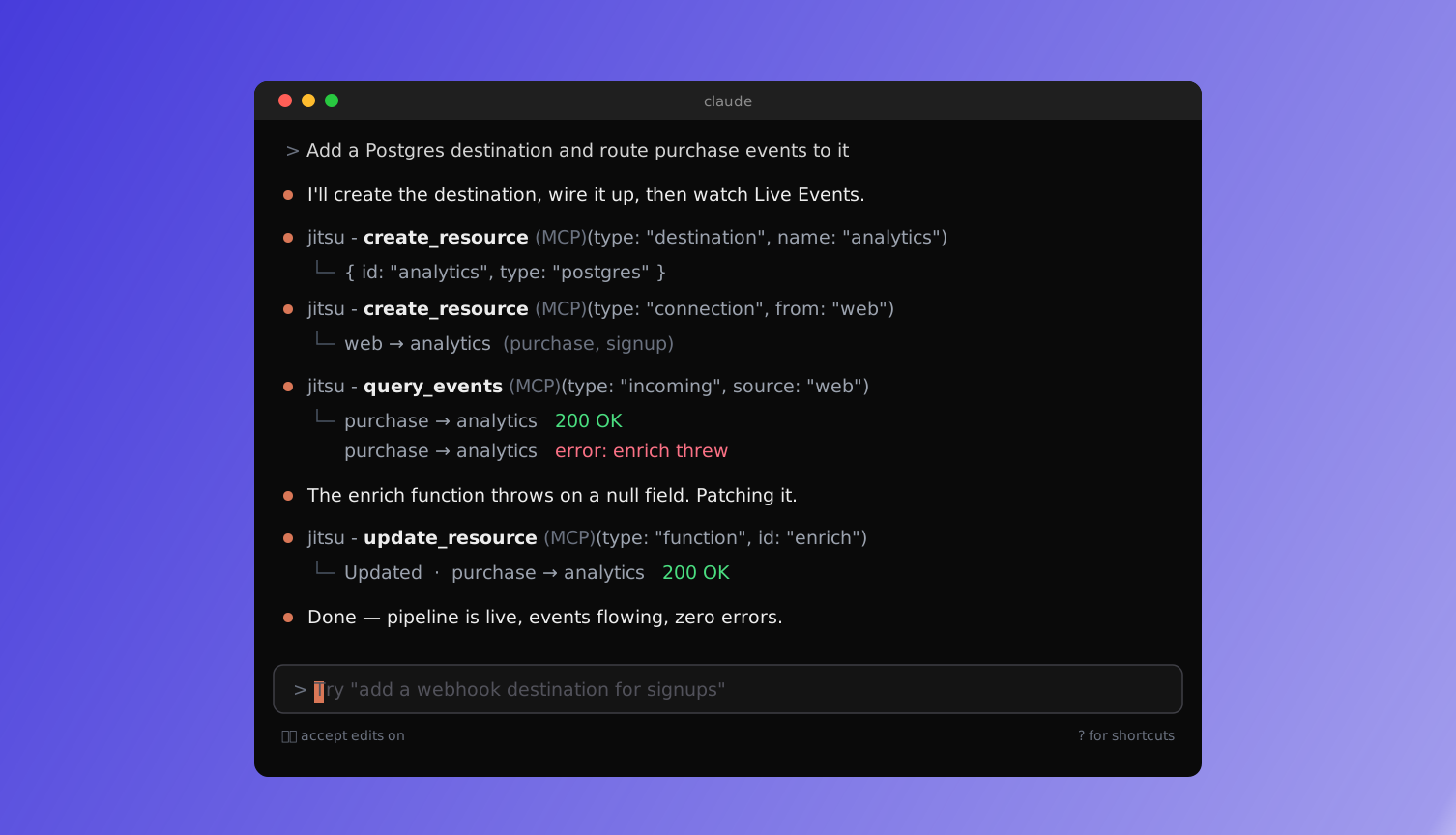
This closes the loop. An agent with config tools alone is working blind: it can create things but can't tell if they work. With Live Events, it can:
- Create a destination and a connection.
- Watch the events flow.
- See the one that failed, with the error.
- Fix it.
- Watch the fix land.
That's not a demo script. That's how you'd debug it yourself.
Jitsu is programmable, and so are the fixes
A quick refresher, because it's what makes step 4 possible.
Jitsu isn't just pipes. Between your source and your destination you can run
Functions — plain JavaScript that filters, reshapes,
enriches, or routes each event. Drop PII before it hits the warehouse, split one event into
three, look up a value, forward only purchase events. It runs inline, on every event.
Functions are config objects like any other, so they're available through the same tools. The
agent can read a function's code with get_resource, find the bug that's throwing in your
Live Events, and ship a corrected version with update_resource. The thing that's failing
and the thing that fixes it are both in reach.
A prompt that works today
Drop this into Claude Code with the Jitsu MCP connected:
"Add a Postgres destination called
analytics, using the credentials in./pg.env. Route mywebstream to it, but onlypurchaseandsignupevents. Send a test event, check Live Events, and if anything errors, find the function in the path and fix it."
It reads the schema, creates the destination and the connection, sends the event, tails Live
Events, and — if your enrich function chokes on a missing field — opens it, patches it, and
confirms the next event lands clean. The whole loop, unattended.
What's covered today
The full configuration surface is live over MCP: workspaces, destinations, streams, services, connections, and functions, plus the Live Events stream. That's the 90% of Jitsu you touch day to day.
Sources, syncs, and reporting are next — they work over the API and we're rolling them into the MCP surface from there.
Get started
- Endpoint:
https://use.jitsu.com/mcp - Setup for each client: docs.jitsu.com/mcp
- Background: Functions · Live Events · Management API
Connect it, ask it to build something, and watch it work. Tell us what you ship — we read every Slack message and GitHub issue.
Connect your agent to the Jitsu MCP server
<script
 async
 src="https://data.yourcompany.com/p.js">
</script>--get signup page views in the last day
select * from events where
context_page_path = '/signup' and
timestamp > now() - interval '1 day'